Wednesday, March 6, 2019

How to reformat a personal computer?

STEPS TO REFORMAT A PERSONAL COMPUTER

1.Start you PC and press key F2,F12 pr delete key (Depend on your PC model)

YOUR PC BIOS setting will be displayed.
Find boot menu.In boot device priority select CD-ROM as first boot device.

2.Your PC will boot from CD and windows Installation will start.Press enter at this screen.
3.Accept License agreement by pressing F8 key.
4.Delete the partitions.
5.Create the partitions.
6.Define the size of partitions.
7.Now select your desired partitions for installation of Windows XP ad press enter.
8.Choose to format the partitions.Choose NTFS file system quick.
9.Setup will format the partitions.
10.After formatting,setup will start copying files on the hard disk.
11.After copying of files,setup will start installing Windows.
12.Select desired language and regional settings,when prompted by setup.
13.Enter windows key. 
14.Type a name of your computer.
15.Select time and date settings and time zone according to your country.
16.Provide network settings for networking PC's or select typical settings and press enter.
17.Setup will install devices and register components.
18.After completion setup will do a cleanup of files and will restart you PC automatically.At this stage you can remove CD


Tuesday, March 5, 2019

How to share file and printer in a computer network

WORKING WITH COMPUTER NETWORK


PREMIRILY STEPS:
1.Creating IP Address
2.Configure IP Address
3.Set windows firewall settings
4.Set up a home or small of office Network

SHARING FILE ON A NETWORK:
1.Place the file inside the folder.
2.Right click the folder.
3.Click properties.
4.Click sharing.
5.Click share this folder on a network
6.Click apply
7.Click OK

CHECKING THE FILE(CLIENT)
1.Click start button
2.Click run
3.Then type \\[IP Address of server]

SHARING PRINTERS ON A NETWORK(SERVER)
1.Click control panel
2.Click add printer
3.Right click printer
4.Click sharing
5.Click share this printer
6.Click apply
7.Click OK

CONNECTING PRINTER ON A NETWORK(CLIENT)
1.Click run
2.Then type \\[IP Address of client]
3.Double right click printer and faxes
4.Right click printer
5.Click connect


Wednesday, January 16, 2019

What is a Network or IP Address

WHAT IS A NETWORK ADDRESS?

Network Address
Image result for what is network address

network address is an identifier for a node or host on a telecommunications networkNetwork addresses are designed to be unique identifiers across the network, although some networks allow for local, private addresses or locally administeredaddresses that may not be unique.

EXAMPLE OF NETWORK ADDRESS
  Related image
IP VERSIONS

IPv4-Internet Protocol Version 4 (IPv4) is the fourth revision of theInternet Protocol and a widely used protocol in data communication over different kinds of networks. IPv4 is a connectionless protocol used in packet-switched layer networks, such as Ethernet.
Related image
IPv6-is a set of specifications from the Internet Engineering Task Force (IETF) that's essentially an upgrade of IP version 4 (IPv4).
Image result for ip version 6
BINARY DIGIT
Image result for binary digits
-Decimal to binary conversion is an important task to understand in IP addressing and Subnetting. IP addressing is a core functionality of networking today. The knowledge of how to assign an IP address, or determine the network or host ID via a subnet, is vital to any good network engineer. Having a good, solid understanding of the simple things makes more complex tasks easier. Here are steps on how to convert a decimal IP address to its binary form, without memorization.

Image result for bytes ip address


A bit (short for binary digit) is the smallest unit of data in a computer. A bit has a single binary value, either 0 or 1. Although computers usually provide instructions that can test and manipulate bits, they generally are designed to store data and execute instructions in bit multiples called bytes.

CLASSES OF IP ADDRESS
Image result for classes of ip address

127 - Loop back Function of a network 


Class D - Use for MULTICAST 


Class E - reserved for FUTURE or EXPERIMENTAL PURPOSES. 


STEPS IN CREATING IP ADDRESS
1.Right click My Network Places

2.Click Properties
Image result for right-click my network places

3.Right click Local Area Connection

4.Click Properties
Image result for Right click Local Area Connection

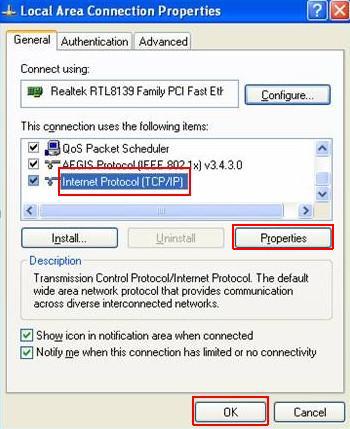
5.Click TCP/IP

6.Click Properties
Image result for click properties

7.Click OK

STEPS IN IP CONFIGURATION
1.Click Start button
Related image


2.Click Run 
Image result for click run

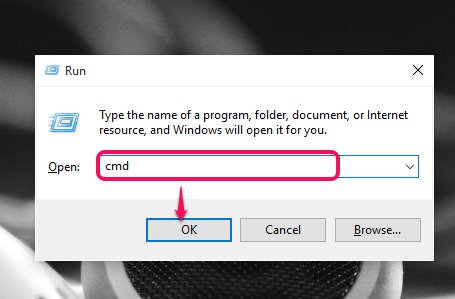
3.Type CMD
Image result for type cmd

4.Type ipconfig
5.Type ping [IP ADDRESS]
Image result for type ping run


Wednesday, October 10, 2018

WHAT ARE THE TYPES OF CABLE?

A.TWISTED PAIR
is the ordinary copper wire that connects home and many business computers to the telephone company. To reduce crosstalk or electromagnetic induction between pairs of wires, two insulated copper wires are twisted around each other.

Image result for twisted pair
       a.STP
is similar to UTP but with each pair covered by an additional copper braid jacket or foil wrapping. This shielding helps protect the signals on the cables from external interference.


Related image
     b.UTP
Short for , unshielded twisted pair a popular type of cable that consists of two unshielded wires twisted around each other. Due to its low cost, UTP cabling is used extensively for local-area networks (LANs) and telephone connections.

B.COAXIAL
Coaxial cabling has a single copper conductor at its center. A plastic layer provides insulation between the center conductor and a braided metal shield (See fig. 3). The metal shield helps to block any outside interference from fluorescent lights, motors, and other computers.

Image result for coaxial cable definition

C.FIBER OPTIC 
consists of a center glass core surrounded by several layers of protective materials (See fig. 5). It transmits light rather than electronic signals eliminating the problem of electrical interference. This makes it ideal for certain environments that contain a large amount of electrical interference. It has also made it the standard for connecting networks between buildings, due to its immunity to the effects of moisture and lighting.

Explain the difference between straight-through cable and cross-over cable.

STRAIGHT-THROUGH CABLE
A straight through cable is a type of twisted pair cable that is used in local area networks to connect a computer to a network hub such as a router.


CROSS-OVER CABLE
An Ethernet crossover cable is a type of Ethernet cable used to connect computing devices together directly.


Wednesday, October 3, 2018

What are the types of network topology?

LINEAR BUS TOPOLOGY
s a type of network topology in which each device is connected one after the other in a sequential chain (shown right). In this case, the bus is the network connection between the devices, and if any link in the network chain is severed, all network transmission is halted.
Image result for linear topology
STAR TOPOLOGY
all computers and devices are connected to a main hub or switch. The hub or switch amasses and disburses the flow of data within the network. Star topology is the most common type of network and follows the Ethernet standard.
Image result for star topology

RING TOPOLOGY
computers and devices are connected to a closed loop cable. Here there are no terminating ends so if one system crashes the entire network goes down. Each computer functions as a repeater and charges the signal before sending it to the next station.
Image result for ring topology

MESH TOPOLOGY
mesh topology can be a full mesh topology or a partially connected mesh topology. In a full mesh topology, every computer in the network has a connection to each of the other computers in that network
Image result for mesh topology
BUS TOPOLOGY
 – in this arrangement computers and devices are connected to a single linear cable called a trunk. The trunk is also referred to as the backbone or a segment. Each end of the trunk must be discharged to prevent the signal from rebounding back up the cable.


HYBRID TOPOLOGY
Hybrid topology is an integration of two or more different topologies to form a resultant topology which has many advantages (as well as disadvantages) of all the constituent basic topologies rather than having characteristics of one specific topology.
Image result for HYBRID topology
SOURCE:


sources:
https://www.computerhope.com/jargon/s/startopo.htm

Tuesday, August 28, 2018

What are the types of computer network?

Types of Network

Local Area Network(LAN)

- is a type of network where two as much as hundreds of computers are connected with each other using a network sharing device known as a hub or switch to enable sharing of files, printers, and other resources.


Personal Area Network(PAN)

- is a computer network that needs to interconnect devices on an individual workplace.

Metropolitan Area Network(MAN)

- is a buyer network than LAN. It involves connecting several network together that resides within a city, town or metropolis.


Wide Area Network(WAN)


- is simply a network consisting of interconnected LANs. It is usually dispersed over a very wide area, and it is not uncommon to see WANs reaching access continents to link office networks with one another.


Wednesday, July 11, 2018

How to be a responsible netizen?

To be a responsible netizen is being concerned about what is happening around us. Internet is growing today around us but many people have become victims of hacking,theft,cyber stalking,child soliciting etc. 


To think of what I can contribute to our country and how can I help in my own little ways to what our country is facing now. Cyber crime is committed over the internet. And individuals need to know how to protect themselves and the people for which they are responsible.


 I can be a responsible netizen by doing what is right, by being involved in the socio-economic growth of our country and how we can participate on this matter and by having a voice in delivering our message to the direct person concerned on our financial crisis now and other related concerns,to awaken this people to do they job righteously by using social media properly in a way we are not going beyond the line.